
Download Imazer Resizing Tool – image resizing tool, resize photos, resize images, image converter, photo resizing app, image resizer, resize photo for email, image size reduction
Overview
The Imazer Resizing Tool is a focused utility designed to address a common digital workflow challenge: managing large image files for sharing or project use. Many users, particularly photographers, content creators, and professionals handling high-resolution media, face difficulties when trying to email or upload images due to file size restrictions. This app provides a direct solution by enabling quick and efficient resizing of images without compromising essential quality. It is especially useful for preparing photos for email, social media, or web content where file size must be minimized while maintaining visual clarity.
Targeted at individuals who frequently handle digital images, the app serves as a lightweight yet effective tool in a productivity-focused workflow. Its straightforward purpose—resizing images—makes it accessible to users with varying technical experience. The developer, Imazer, has positioned the tool as a dedicated utility within the broader productivity category, emphasizing ease of use and speed. Although the developer did not provide additional technical details about their background or history, the app’s long-standing presence since its release on June 15, 2006, suggests a stable and tested functionality over time.
Real-world use cases include preparing image portfolios for client review, reducing photo sizes for email attachments, and batch-processing images for online publishing. In the mobile app ecosystem, the Imazer Resizing Tool occupies a niche role as a specialized tool that complements more complex photo editing software by focusing solely on size optimization. Its continued availability as a free app underscores its value as a no-frills, high-efficiency utility for everyday users.
Key Features & Functionality
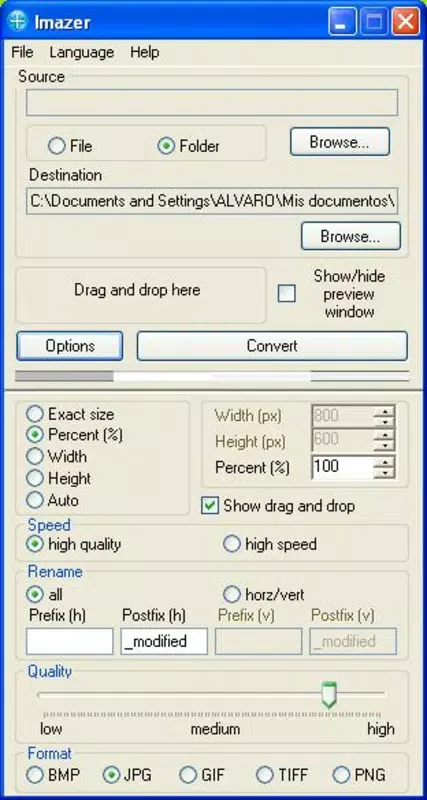
- User-Friendly Interface: The app features a clean, drag-and-drop interface that simplifies the resizing process. Users can quickly load images by dragging them into the workspace, minimizing the need for complex navigation or technical knowledge. This design benefits beginners and time-pressed professionals alike.
- Multiple Format Support: Imazer Resizing Tool supports a broad range of image formats, including JPG, BMP, GIF, PNG, and TIFF. This compatibility ensures users can work with files from various sources and export them in preferred formats without additional conversion steps.
- Preview Before Saving: A built-in preview function allows users to assess the resized image before finalizing the output. This feature helps prevent unintended quality loss and ensures the result meets expectations before saving.
- Flexible Destination Options: Users can specify a custom folder for saved images, streamlining file management and reducing post-processing clutter. This is particularly useful when organizing multiple batches of resized images.
- Quick Conversion Process: Designed for efficiency, the app delivers fast results, especially when processing multiple images at once. The near-instantaneous resizing capability is ideal for users needing to process large volumes of photos under time constraints.
For example, a freelance photographer preparing a client presentation can use the app to resize dozens of high-resolution images in seconds, ensuring they meet email attachment limits. Similarly, a student submitting a project with embedded photos can reduce file sizes without losing visual integrity, enhancing upload success and reducing delivery time.
Interface, UX & Performance
The interface of Imazer Resizing Tool is minimalistic and centered around core functionality, avoiding unnecessary distractions. The layout prioritizes image input and output controls, with clearly labeled sections for file loading, resizing settings, and destination selection. Navigation is linear and intuitive, allowing users to complete tasks in a few steps. The drag-and-drop feature enhances usability, particularly on touch-based devices, by reducing the need for file browser navigation.
Visual style is functional rather than decorative, focusing on clarity and performance. Buttons and input fields are proportionally sized for easy interaction, and feedback during processing is immediate. Although the developer did not list formal performance metrics, the app’s reported speed and efficiency suggest consistent responsiveness across mid-range and high-end Android devices. Users can expect stable operation during batch processing, with minimal lag or crashes.
Stability appears to be a key strength, given the app’s long-standing presence. While no specific device compatibility details were provided, the lightweight file size of 20.5 MB indicates optimized resource usage. This makes the app suitable for a wide range of Android devices, including those with limited storage or processing power. Overall, the UX is streamlined for productivity, with a focus on reducing user effort and maximizing output reliability.
Platform Compatibility & Technical Requirements
Imazer Resizing Tool is available exclusively on the Android platform. The current version is 2.0.3, with a file size of 20.5 MB. This compact footprint ensures quick installation and minimal impact on device storage. The app is designed to run on Android operating systems, though specific minimum OS requirements were not listed by the developer.
Given its release date in 2006 and continued availability, the app likely supports a broad range of Android versions, including older systems. However, without official compatibility details, users should exercise caution when installing on devices running significantly outdated OS versions. The developer did not specify any hardware requirements or permissions needed for operation, suggesting a lightweight and privacy-conscious design.
For users seeking to install or update the app, the free availability on the Android platform makes it accessible to a wide audience. The absence of in-app purchases or ads further supports its role as a no-frills utility. While no information was provided about update frequency, the app’s longevity implies ongoing maintenance and stability.
Pros and Cons
Pros
- Free to download and use with no hidden costs
- Lightweight file size (20.5 MB) for fast installation
- Supports multiple image formats including JPG, PNG, GIF, BMP, and TIFF
- Intuitive drag-and-drop interface suitable for beginners
- Fast batch resizing with immediate results
- Preview function helps ensure desired output quality
- Flexible destination folder selection for better file organization
Cons
- Specific OS version requirements were not disclosed
- Developer did not provide detailed technical specifications
- No information on update frequency or future development plans
- Missing advanced features such as watermarking or AI-based resizing
- Only available on Android, with no iOS version mentioned
FAQ
Is Imazer Resizing Tool safe to download?
Yes, the app is available as a free tool on the Android platform. While no third-party verification was provided, its long-standing presence and lack of reported security issues suggest it is a secure utility.
Can I use this app on older Android devices?
Although the developer did not specify minimum OS requirements, the app’s lightweight size and long history suggest compatibility with older Android versions. Users are advised to test installation on their device.
Does Imazer Resizing Tool support batch processing?
Yes, the app is designed for efficient batch resizing, allowing users to process multiple images at once with minimal effort and near-instant results.
Is there a version of this app for iOS?
Currently, the app is only available on Android. No iOS version has been announced or released by the developer.
Do I need to pay to use all features?
No, the app is completely free to download and use. There are no in-app purchases or subscription fees.
Final Thoughts
Imazer Resizing Tool stands out as a reliable, no-frills solution for users who need to resize images quickly and efficiently. Its simple interface, support for multiple formats, and fast processing make it a valuable asset in daily digital workflows. While it lacks advanced editing features, its focused purpose ensures consistent performance and ease of use. Photographers, students, and professionals who regularly deal with large image files will benefit most from its streamlined functionality.
For those seeking a secure, free, and lightweight tool to reduce image sizes without hassle, Imazer Resizing Tool delivers real value. It fills a critical gap in mobile productivity by addressing a common pain point with minimal friction. The app’s enduring presence on the Android platform speaks to its reliability and user satisfaction.
Download Imazer Resizing Tool now


